

Table of Contents
Introduction
In the ever-evolving world of digital marketing, user experience has become a cornerstone of success. Google has consistently pushed for improved page experience to create a better browsing experience for users. One of the major updates in this domain is the introduction of Core Web Vitals. These are a set of performance metrics that Google uses to evaluate and score your website’s page experience, directly impacting its search rankings.
If you’re a website owner or digital marketer, understanding Core Web Vitals in Google Search Console is crucial. This is where you can monitor and measure essential performance metrics like LCP (Largest Contentful Paint), INP (Interaction to Next Paint), and CLS (Cumulative Layout Shift). In this blog, we will dive deep into these metrics and explain how you can leverage Google Search Console to improve your website’s page experience.
What Are Core Web Vitals in Google Search Console?
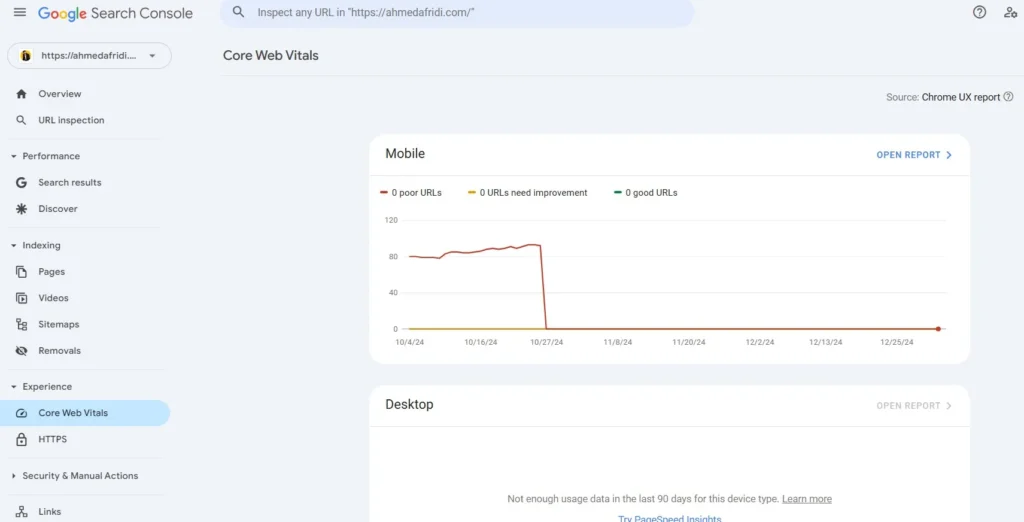
Core Web Vitals are a set of performance metrics introduced by Google to assess the quality of a page’s user experience. These metrics focus on real-world user experience, such as how quickly a page loads, how responsive it is, and how stable the content is when it’s being loaded. These signals are crucial for search engine rankings because they reflect the quality of the page’s user experience.
The three key metrics within Core Web Vitals are:
- LCP (Largest Contentful Paint)
- INP (Interaction to Next Paint)
- CLS (Cumulative Layout Shift)
These metrics are now integrated into Google Search Console as part of the Page Experience report, helping you identify areas where your website’s user experience can be improved.
LCP (Largest Contentful Paint): Understanding the Impact
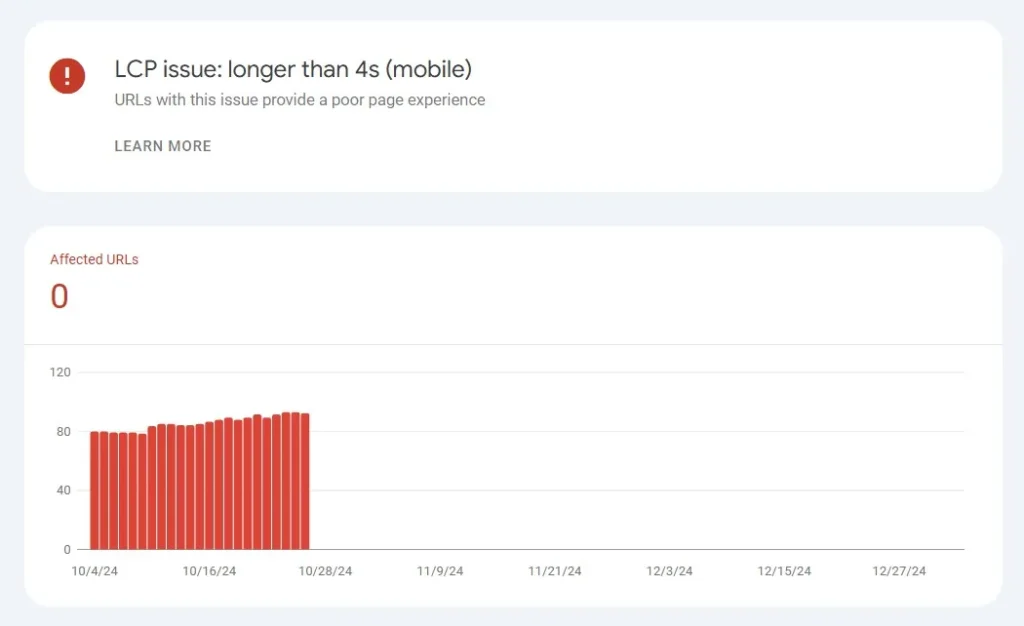
LCP (Largest Contentful Paint) measures how long it takes for the largest element on your page (such as an image, video, or block of text) to load and become visible to the user. The goal is to ensure that your page loads quickly and provides content to users as soon as possible. Google considers pages with an LCP of 2.5 seconds or less to provide a good user experience.
Example:
Imagine you visit a website, and the main image or content block takes 5 seconds to load. This would lead to a poor user experience and a high LCP score. On the other hand, if the content appears within 2.5 seconds, the LCP would be considered good.
In GSC, check LCP scores in the Core Web Vitals report under the Page Experience section. If your LCP is higher than 2.5 seconds, you’ll want to focus on improving it by:
- Optimizing images: Compressing large images and using modern formats like WebP can significantly reduce load times.
- Reducing server response times: Slow server performance can contribute to poor LCP. Opt for faster web hosting or a Content Delivery Network (CDN).
- Lazy loading: Defer loading offscreen images until needed to reduce initial load time.
INP (Interaction to Next Paint): A Measure of Interactivity
INP (Interaction to Next Paint) measures responsiveness to clicks, taps and keyboard interactions throughout a visit. It includes input delay, event processing and the time until the next frame is presented. A good INP is 200 milliseconds or less at the 75th percentile of real visits, assessed separately for mobile and desktop. INP replaced FID as a Core Web Vital in March 2024.
Example:
When a visitor opens a menu, types in a form or presses a button, the page should respond promptly and show the result. Long JavaScript tasks can delay that next visible update. Test representative interactions rather than measuring only the first click.
To improve INP, consider these strategies:
- Minimize JavaScript: Heavy JavaScript can block the main thread and cause delays in processing user inputs. Reducing or deferring non-essential JavaScript can improve interactivity.
- Use a lightweight framework: Consider using modern frameworks like React or Vue.js that are optimized for fast loading and responsiveness.
CLS (Cumulative Layout Shift): Preventing Visual Instability
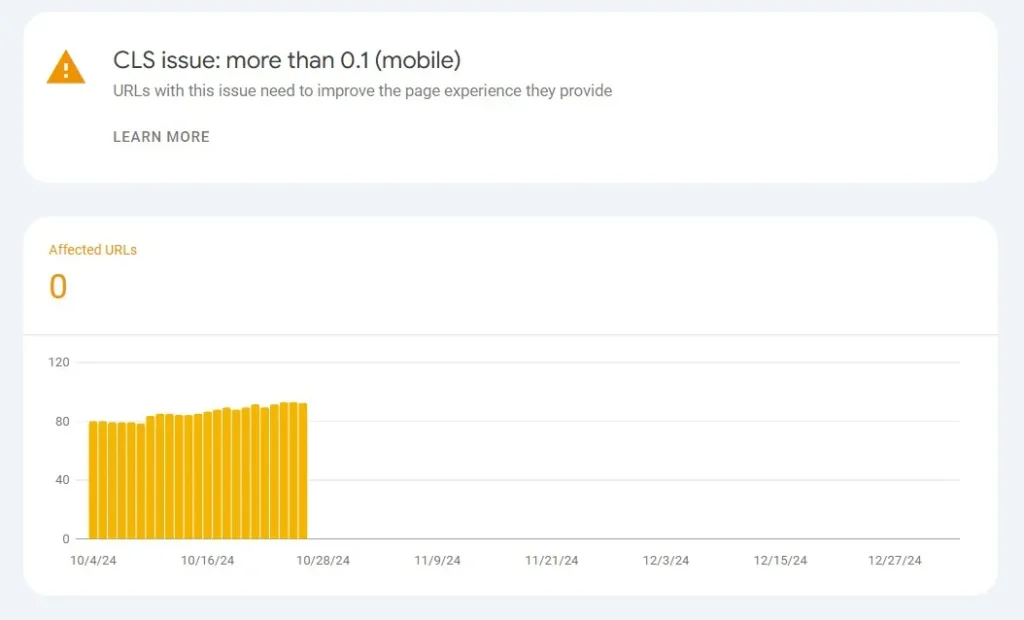
CLS (Cumulative Layout Shift) measures how much the elements on a page shift while it’s loading. A high CLS score indicates that users might experience unexpected layout changes, like text shifting when an image finally loads, which is frustrating.
A CLS score of 0.1 or less is good. Above 0.1 and up to 0.25 needs improvement; above 0.25 is poor. Evaluate the 75th percentile of real visits.
Example:
Imagine you are reading an article and suddenly, the text moves because an image was loaded late. This is an example of a high CLS. It disrupts the user experience and makes the page feel unstable.
To improve CLS, you can:
- Reserve space for images: Make sure that images and ads have reserved space in the layout before they load to prevent them from shifting other content.
- Avoid inserting content above existing content: Ensure that new content, such as pop-ups or ads, does not push content down the page unexpectedly.
Page Experience and Core Web Vitals: Why It Matters for SEO
Google’s Page Experience update, which began rolling out in 2021, places more emphasis on user experience as a ranking factor. Websites which have better page experience having more chances to rank higher on search results. Core Web Vitals are a significant part of this update. When your Core Web Vitals scores are in the green (i.e., good), it signals to Google that your site provides a smooth, fast, and interactive experience for users.
Here are some steps to check your Page Experience and Core Web Vitals in Google Search Console:
- Log into Google Search Console: If you haven’t set it up yet, check out my guide on Setting Up Google Search Console to get started.
- Navigate to the Core Web Vitals report: You’ll find it under the “Experience” tab.
- Analyze the data: The report will show the performance of your pages based on LCP, INP, and CLS, and whether they meet Google’s thresholds for a good user experience.
- Take action: Google provides suggestions on what can be fixed. Follow these recommendations to improve your scores.
Using GCS to Improve Core Web Vitals
In addition to checking the Core Web Vitals report in Google Search Console, there are a few more things you can do to improve your site’s page experience:
- Fix Crawl Errors in GSC: Your site can be slow down due to Crawl errors, affecting your Core Web Vitals. Make sure your site is accessible by fixing crawl errors in Google Search Console.
- XML Sitemap: Having a proper XML Sitemap ensures that Google can crawl all your important pages efficiently. This can indirectly help improve Core Web Vitals scores by speeding up page load times.
- Performance Reports: Performance Reports in GSC provide insights into how users are interacting with your website. Analyzing these reports can help you spot performance issues that are affecting your Core Web Vitals.
Conclusion
Optimizing Core Web Vitals in Google Search Console is an essential task for anyone serious about improving their site’s user experience and SEO performance. By focusing on LCP, INP, and CLS, and taking action to improve them, you can provide a better experience for your users and improve your site’s ranking in search results.
If you need more information about Google Search Console Overview, setting up Google Search Console, or fixing crawl errors, make sure to explore my other blogs, including guides on Google Search Console Indexing, Structured Data, and more.
Remember, a site with great Core Web Vitals signals to Google that it’s fast, responsive, and user-friendly, and that’s exactly what users—and search engines—want!
Frequently Asked Questions
1. Define Core Web Vitals in GSC?
Core Web Vitals in Google Search Console are performance metrics like LCP, INP, and CLS that measure the quality of your website’s user experience, affecting your SEO rankings.
2. How can I improve my LCP?
You can improve your LCP by optimizing images, reducing server response times, and using a Content Delivery Network (CDN).
3. What is a good INP score?
INP is good at 200 milliseconds or less, assessed at the 75th percentile of real visits. Above 200 and up to 500 milliseconds needs improvement; above 500 milliseconds is poor.
4. How do I check my CLS in Google Search Console?
You can check your CLS under the Core Web Vitals report in Google Search Console. A score of 0.1 or less is considered good.
5. Can Core Web Vitals affect my SEO ranking?
Yes, Google uses Core Web Vitals as part of its ranking algorithm, so improving these metrics can positively affect your SEO.
Current metric definitions and thresholds: Google’s Web Vitals documentation. Laboratory tests help diagnose issues; Search Console uses field data and may take time to reflect improvements.